Construction Estimate Maker AI
Describe the job in your own words. The app lists the work, you set the prices, and your client signs a professional estimate on your iPhone before you leave the driveway.

Describe the job
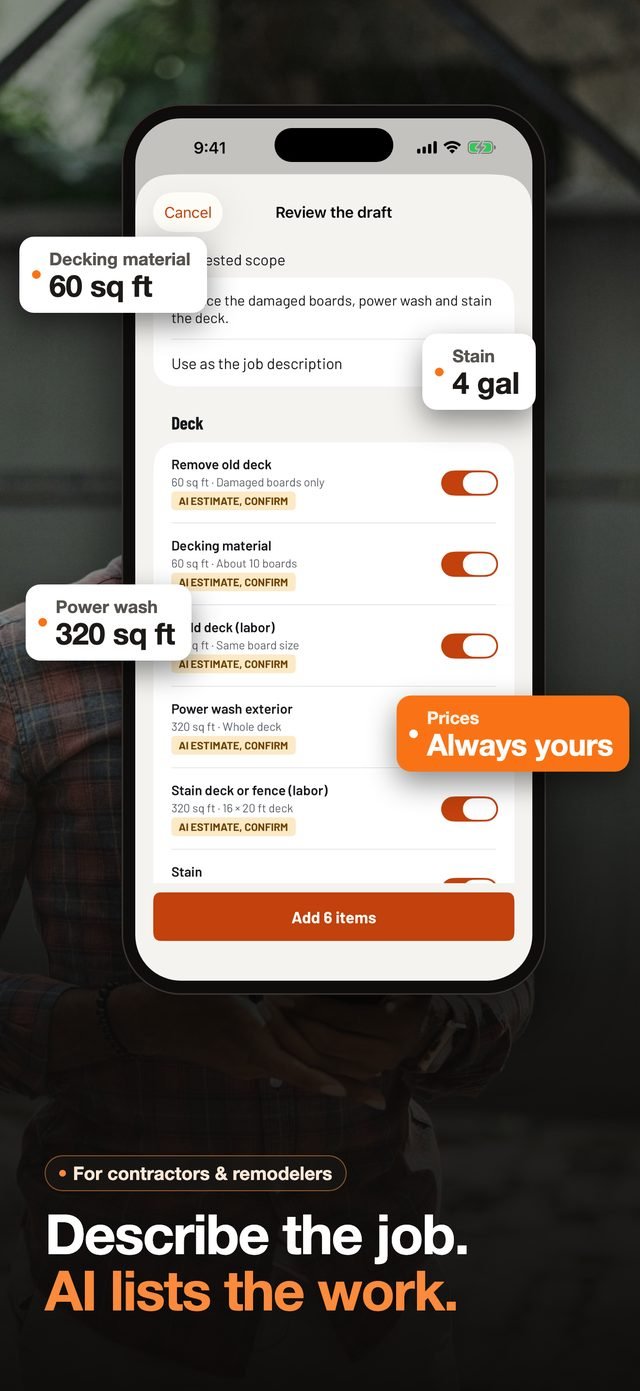
Say it, type it or photograph it. The AI lists the work.
"Retile a 10 by 12 bathroom floor, remove the old vinyl, new toilet." Type it, say it, or add photos of the site. The AI proposes the line items, asks you only the questions that change the estimate, and leaves every decision to you.
- Dictation turns your voice into text on your iPhone
- Up to five photos help the AI understand the job
- Room measurements turn into quantities: square feet of floor, walls and ceiling
- You review, change or delete every line before anything goes to your client
The AI suggests the work. It never makes up a price.
Your prices, exact math
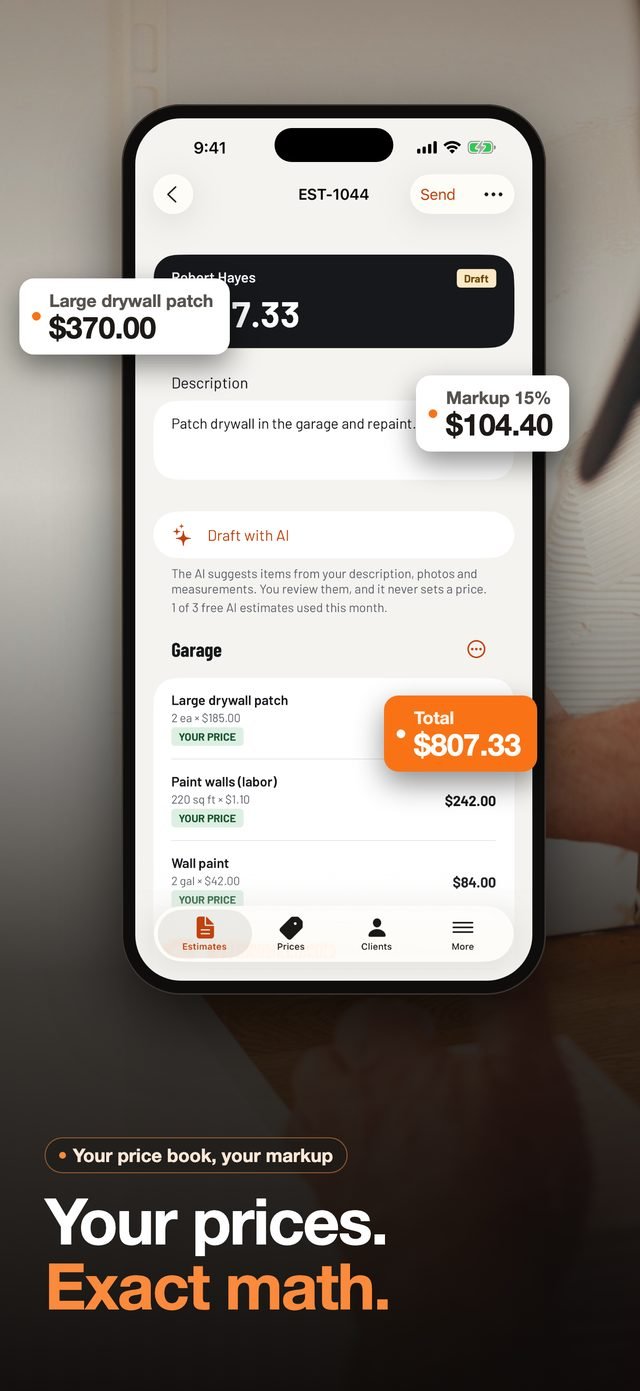
The AI proposes. The math is done by code, to the cent.
Every total is calculated by the app, never by the AI: quantities, waste, materials, labor, markup and sales tax. Paint gallons for two coats, tile with 10% waste, thinset and grout bags, drywall sheets and joint compound are worked out from your measurements.
- Your own price book: set a price once, and it is ready on the next estimate
- 187 common items across 17 trades to start from, with no made-up prices
- Markup and sales tax applied the way you choose
- On a first estimate, missing prices are asked one at a time and saved to your price book
Show the finished job
Let your client see the result before the work starts.
Choose a photo of the space, describe the work, and the AI draws a picture of the finished job to show your client. The feature is optional and asks for your permission first.
An AI picture can differ from the real result in colors, materials or details. Check it before you show it, and use only photos you have the right to use.
- One photo and the work you describe are all it needs; the photo is sent without its location or camera details
- The picture is saved with the job, and appears on the estimate only if you leave that option on
- Printed on a page of its own, with a note that it is not part of the agreement
- An invisible SynthID watermark marks the picture as made by AI
- 3 pictures a month on the free plan, 50 on Pro
Send and get signed
A professional estimate, signed on the spot.
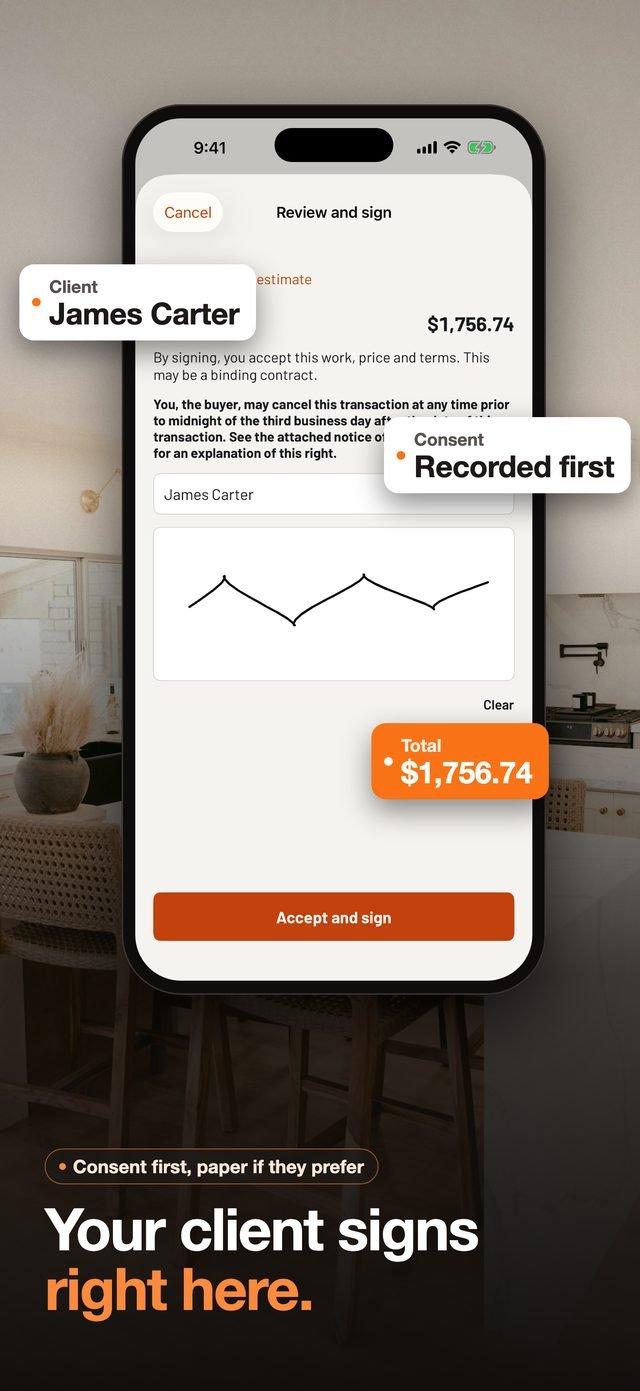
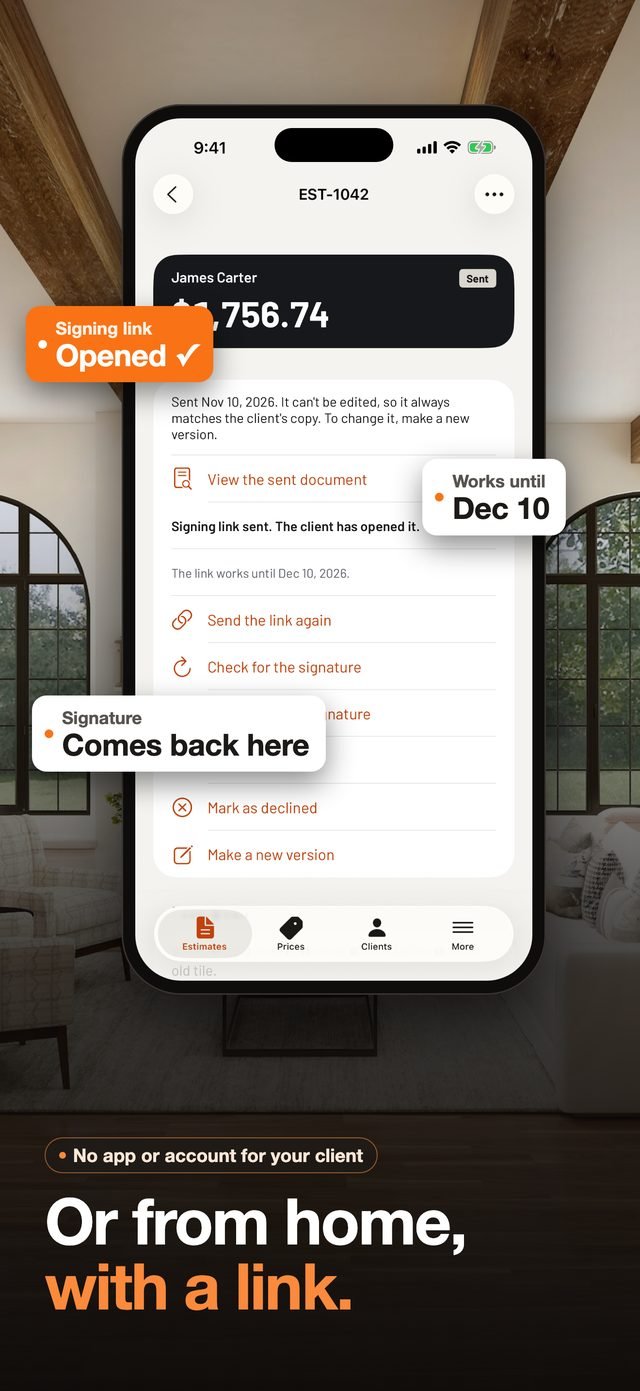
Your logo, your license number, your insurance and clear payment terms on a clean PDF. Hand your iPhone to your client, or send a signing link they open on their own phone: they sign with a finger, and the signed document comes back to your app.
- Electronic signature with the client's consent, and a paper option for clients who prefer it
- Signing links: the client reads and signs from home, no app or account needed
- Unsigned estimates are clearly marked as not yet a contract
- Revisions keep their history: R2, R3, so nobody signs the wrong version
- Templates and duplicates for the jobs you do every week
Your document, your way
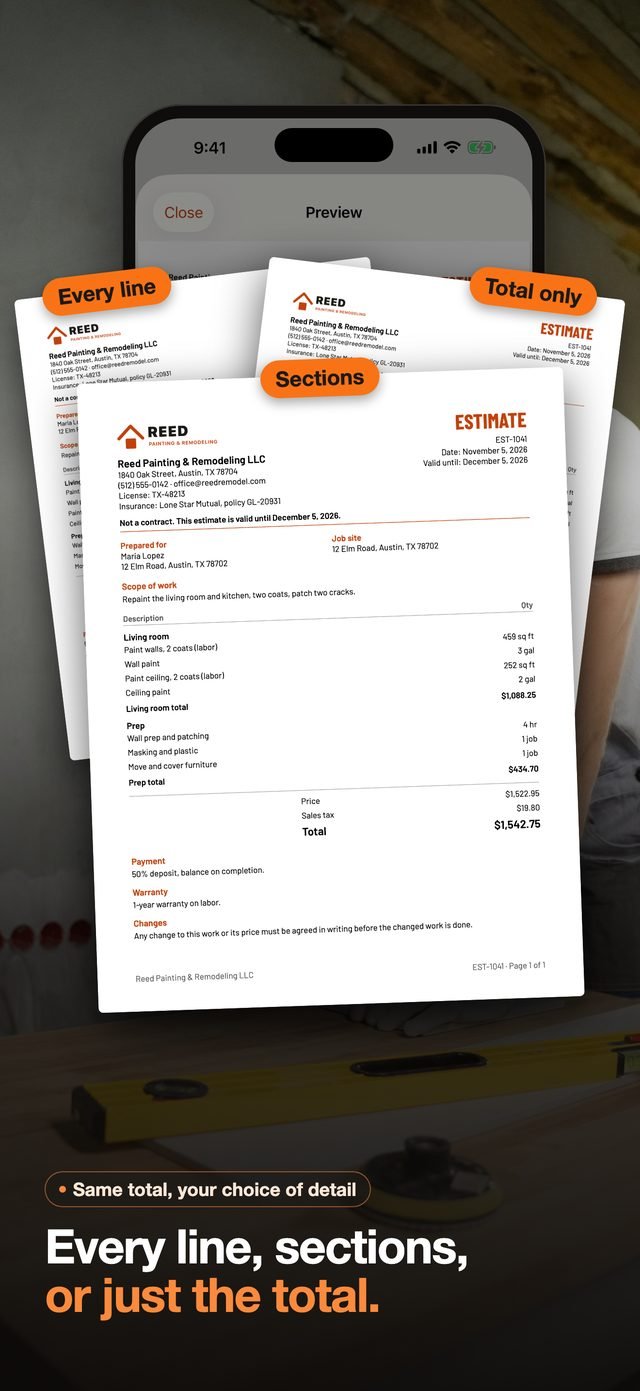
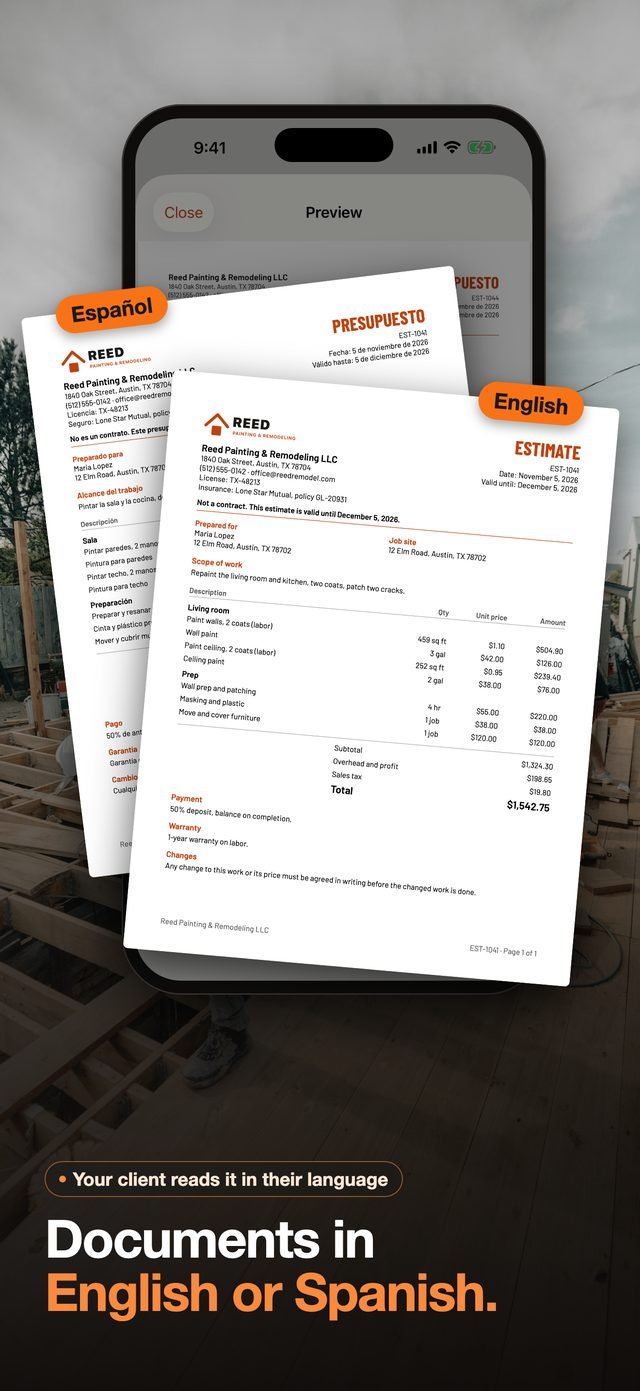
Every line, sections or just the total. In English or Spanish.
The total stays the same. You choose how much detail your client sees, and the language they read it in.
- Choose what the client sees: every line, section totals, or the total only
- Documents in English or Spanish, so your client reads them in their language
- Scope of work, payment terms, warranty and changes clause on every estimate
Built for the rules contractors follow
Reminders before you send, not after a dispute.
When a sale is made at the client's home, the app adds the federal three-day cancellation notice and its form, with the deadline counted in business days. For California, Texas, Florida, New York and Illinois, it reminds you of state requirements before you send.
The app helps you remember. It is not legal advice, and you remain responsible for your contracts.
- The cancellation notice follows the FTC Cooling-Off Rule
- License, EPA and insurance details are printed only when you enter them
- Reminders never block you: you decide what to send
From estimate to paid
One tap from an accepted estimate to the invoice.
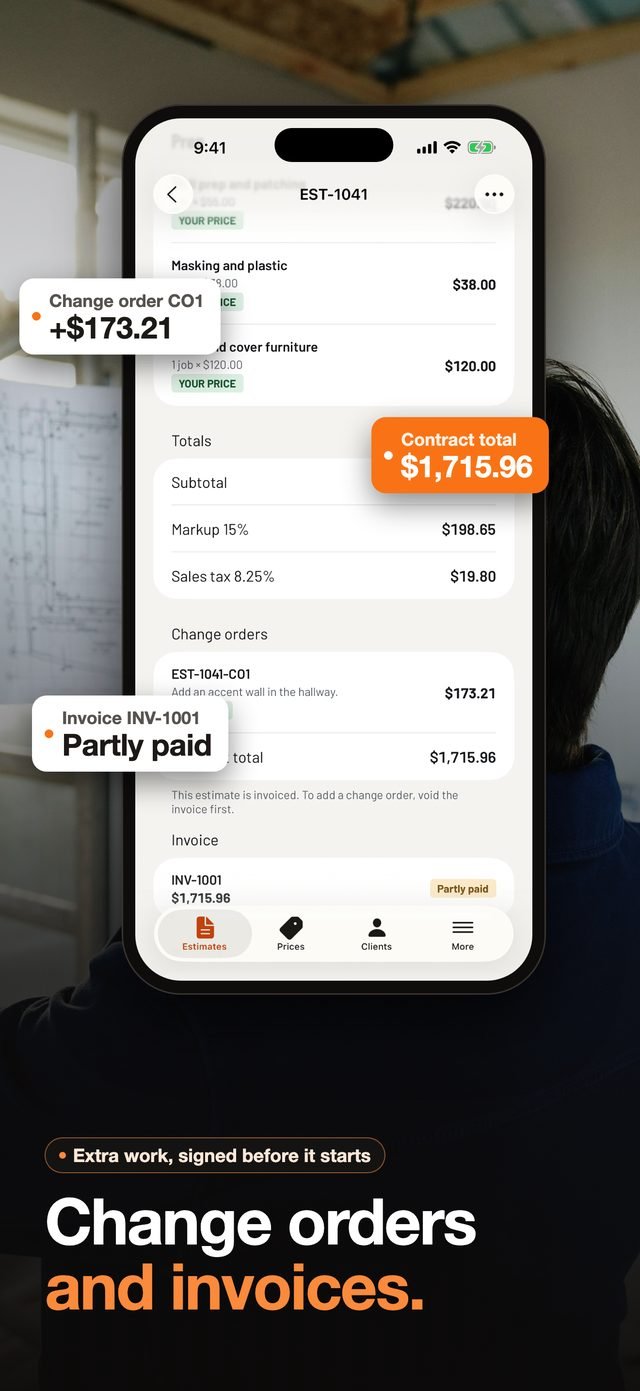
Turn an accepted estimate into an invoice without retyping anything. Record deposits and payments as they come in, and see at a glance what is still owed.
- Change orders for extra work after signing, approved before the work starts, then invoiced with the estimate
- Invoices with your payment terms and due date
- Record partial payments and deposits, with the balance updated (the app records payments: it does not collect them)
- Issued invoices are locked: a wrong one is voided and stays in your records, marked Void
Built into your iPhone
Your business, on your phone and in your own iCloud
iCloud
Estimates, clients and prices stay on your iPhone, synced with your own iCloud account if you want.
Share
Send PDFs by text, email or any app with the share sheet.
Export
Download all your data as CSV files at any time, on any plan.
iPad
The same estimates on a bigger screen in the office.
Free and Pro
Start free. Upgrade when it pays for itself.
Free
No account needed
- 3 AI estimates a month
- 3 pictures of the finished job a month
- 10 documents a month: estimates and invoices
- Signatures, your price book and PDF export
- Reading and exporting your data, always
Pro
$19.99 a month or $149.99 a year in the US. Price shown in the App Store for your country.
- 60 AI estimates a month
- 50 pictures of the finished job a month
- Unlimited documents
- Everything in Free
Pro renews automatically until you cancel. Cancel at least 24 hours before the renewal date in your Apple Account settings. There is no weekly plan and no trial that turns into a charge: the free plan is the trial.
FAQ
Questions about Construction Estimate Maker AI
Does the AI decide my prices?
No. The AI suggests which items the job needs. Prices come from your own price book, or from you. When an item has no price yet, the app asks you for one instead of guessing.
Which AI does the app use?
Claude, the AI model made by Anthropic, suggests the work items. Gemini, the AI model made by Google, draws the optional pictures of the finished job. For an estimate, the app sends only the job description, up to five photos, room measurements and your answers to its questions. For a picture, it sends one photo you choose and the work you describe. Nothing is sent unless you choose to use AI, and client names and addresses are never sent.
Can I show my client what the finished job will look like?
Yes. Choose a photo of the space and describe the work: the app draws a picture of the finished job with Gemini, the AI model made by Google. The feature is optional and asks for your permission first. The free plan includes 3 pictures a month, Pro 50.
Is the picture of the finished job part of the contract?
No. It is an illustration made by AI and can differ from the real result. The app prints it on a page of its own with a note that it is not part of the agreement, and you choose whether it appears on the estimates you send.
Which trades does it cover?
Painting, carpentry, kitchen and bath, flooring, tile, drywall, plumbing, electrical, doors and windows, roofing and gutters, concrete and masonry, HVAC, landscaping, demolition, siding, insulation and general labor.
Is an electronic signature valid?
In the United States, electronic signatures are generally valid under the federal ESIGN Act when the client agrees to sign electronically. The app asks for that consent before signing and offers a paper copy. Some contracts and states have extra requirements, so check with your attorney.
Do I need an account?
No. Your data stays on your iPhone and in your own iCloud. We never see your estimates, clients or prices.
How do I cancel Pro?
On your iPhone, go to Settings › your name › Subscriptions, choose Construction Estimate Maker AI and tap Cancel Subscription. You keep Pro until the end of the period you paid for, then the free plan continues.
I changed iPhone. How do I get Pro back?
Open the paywall in the app and tap Restore Purchases, signed in with the Apple Account you used to subscribe.
Can I get a refund?
Purchases go through Apple: request a refund at reportaproblem.apple.com with the Apple Account you used to subscribe.
Win the job before you leave the driveway
Free on the App Store for iPhone and iPad.
Privacy Policy · Terms of Use · Support
Claude is a trademark of Anthropic, PBC. Gemini is a trademark of Google LLC. Construction Estimate Maker AI is independent and is not made by, endorsed by or affiliated with Anthropic or Google.